To get verified online in Australia, you prove who you are with a Digital ID such as myID, using two or more identity documents and, for stronger levels, a selfie check. If you run a local business, there is a second kind of verification: showing customers that your business is real, qualified and well reviewed. At Business In Focus, we cover both, because homeowners and business owners both end up asking the same question: can I trust who is on the other side of the screen?
This guide walks through the identity check first, then the business side, in plain terms.
TL;DR
- Most Australian online identity checks need at least two documents, one of them usually photo ID such as a passport or driver licence.
- The service you want decides the strength you need (basic, standard or strong), so check that before you start.
- Your name must match your documents exactly. Most failed setups come down to a nickname or a typo.
- Homeowners can check a tradie’s ABN for free before hiring, and read independent reviews in a curated directory.
- Business owners can get a professionally written, verified feature page from $99 per year.
Table of Contents
- What “verified online” actually means
- Choose the identity strength first
- What you need to have ready
- How to complete the check, step by step
- When the check fails
- Keeping your information safe
- For homeowners: verifying the business you hire
- For business owners: getting your business verified
- Putting it together
- FAQ
- Sources
What “verified online” actually means
The phrase covers three different things, and it helps to know which one you need.
Identity verification. A bank, government agency or other online service asks you to prove you are the person you say you are. In Australia this is increasingly done through a Digital ID, which is a reusable way to prove your identity online without handing your documents to every service separately. The Digital ID System guide says you must be at least 15, have an email address or mobile number only you use, own a smartphone and have your documents ready.
Age or eligibility checks. Sometimes a business only needs to know you meet a condition. NAB’s ConnectID guide explains that it can confirm age criteria, such as 16+ or 65+, without sharing your date of birth.
Business verification. A customer wants to know a plumber, electrician or cleaner is genuine before letting them into the house. This is a different job, covered further down.
Choose the identity strength first
A Digital ID comes in three strengths: basic, standard and strong. The online service you want to use sets the minimum, according to the Digital ID System guide. A standard Digital ID needs at least two verified documents. A strong one adds a selfie biometric check, and the photo is deleted unless you say otherwise.
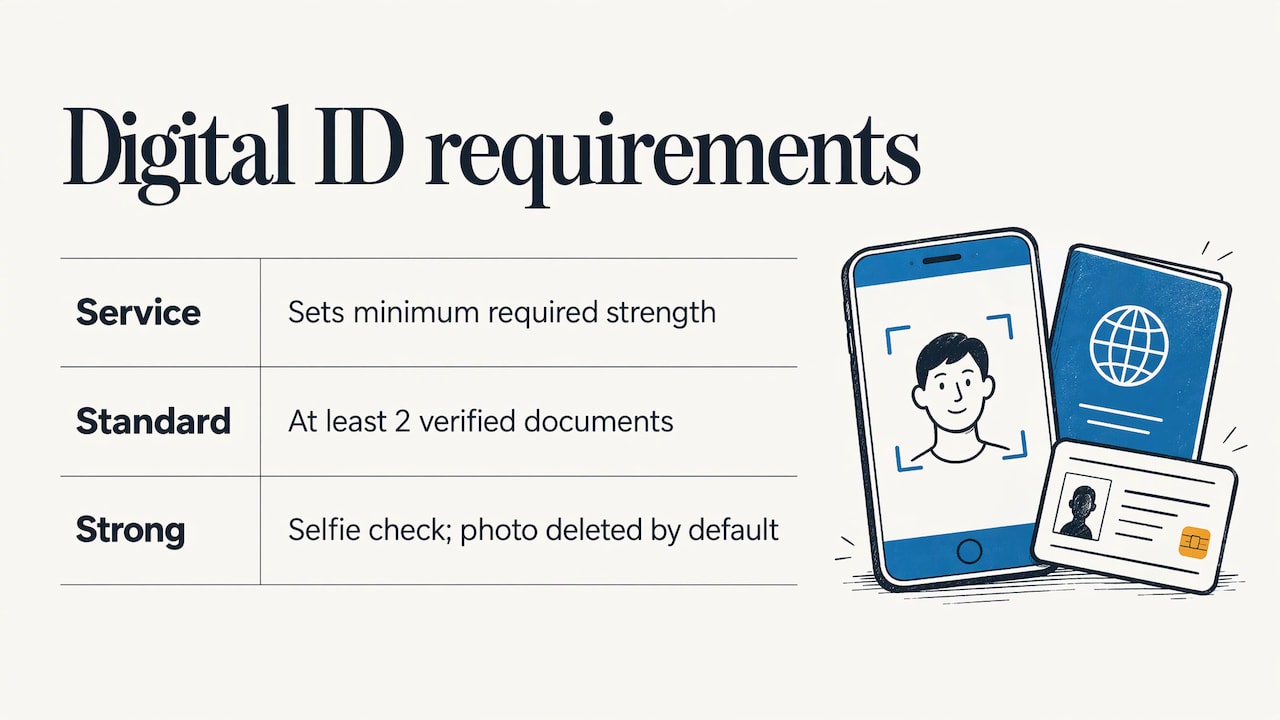
That means the sensible first move is to look at what the service asks for. If it only needs a standard level, you can skip the selfie step. If it asks for strong, plan for it from the start so you do not have to redo anything.
What you need to have ready
The exact list depends on the provider, but the pattern is consistent across Australian systems.
| Provider or scheme | What it asks for |
|---|---|
| myID | At least 2 documents. An Australian passport with photo verification can reach Strong identity strength. |
| Service Victoria | At least 2 ID documents, one with a photo, done on a smartphone through an SMS link. |
| Queensland Digital Identity | One digitally verified document from each of two lists. A name-change or marriage certificate if your names differ. |
| Victorian birth certificate application | One Category 1 and one Category 2 document, at least one with a photo. A regularly used bank account registered for internet banking can serve as an alternative. |
Common documents include an Australian passport, driver licence, birth certificate and Medicare card. Passports have limits: myID says they can’t be verified online if cancelled, expired for more than 3 years, or not Australian. Driver licences can’t be verified if cancelled or refused.
If you have no photo ID, Service Victoria offers an identity referee, a person you choose who confirms who you are, entirely online. Check your own state’s page for the equivalent.
How to complete the check, step by step
Here is the routine for myID, the national Digital ID most Australians meet first.
- Download the app and enter your details. Use your full legal name. The Department of Employment and Workplace Relations says the most important requirement is that your name matches your documents: “Christine Jones”, not “Chris Jones”.
- Add at least two documents. Each is checked against the issuing record, and names must match across all of them.
- Do the photo check if you need Strong. The myID photo verification confirms you are a real person, the right person and present in real time. Allow camera access, use a well-lit area, remove your glasses, hold the device still and move closer until the screen turns from orange to green.
- Use it to log in. At a service’s login page, select “Continue with Digital ID”, choose myID and enter your email. You get a 4-digit code, which you confirm in the app with your password, fingerprint or face. Then you consent to share only what the service needs, as described in how to use myID.
Some organisations run their own check instead. A bank might send an email link to a portal, ask for an SMS one-time password and have you upload a passport or licence, as NAB describes for its online ID check. A law firm may ask for a recent proof of address, a well-lit space and a short selfie video, as in this law-firm verification guide. In every case, use the link the organisation sent you directly, and do not search for a substitute.
When the check fails
Most failures are fixable.
- The strength is too low. The myID help page suggests checking whether the service accepts a lower strength. If not, contact the service provider about alternatives.
- Face verification keeps failing. Quit the app, wait 5 minutes and try again, or look up the error code on the help page.
- The name does not match. If you entered it wrongly in myID, reset the app via Settings and re-enter your full legal name, per the DEWR guidance.
- You do not want a Digital ID. The Digital ID Act 2024 requires Australian Government services to offer another way to access them if you can’t or don’t want to use one, with limited exclusions.
A practical tip: gather documents before you start, in good light, with your phone charged. Most timeouts happen when people hunt for a card halfway through.
Keeping your information safe
Verification asks for sensitive documents, so know what happens to them.
- Under myID’s privacy policy, the ATO handles personal and sensitive information under the Privacy Act 1988 and the Digital ID Act 2024, stores it securely in Australia and discloses it with express consent or when the law requires.
- The myID privacy notice says biometric images used by third-party providers are destroyed within 14 days, and that you can withdraw consent by deleting your myID.
- Before a service receives anything, myID shows what will be shared, such as name, date of birth and email, and requires your consent, according to its Fake news vs fact page.
- The Digital ID Act came into force on 1 December 2024, and the OAIC oversees privacy safeguards for accredited entities, as noted in its August 2025 assessment.
If an email or text asks you to verify and you did not start the process, do not follow the link. Go to the organisation’s official website or app yourself.
For homeowners: verifying the business you hire
Identity checks protect you from fraud. Verifying a tradesperson protects your home and your wallet. Before you book, do three things.
Check the ABN. ABN Lookup is the Australian Business Register’s free public tool. It lets you check whether an ABN is active or cancelled, see the business type and GST status, and view historical trading names. No login is needed. If the name or status does not match what the business told you, ask why.
Read independent reviews. A business’s own website will always look good. Reviews written by someone who has no stake in the result tell you more about punctuality, tidiness and how problems get handled.
Use a curated source. Business In Focus selects listings on verified credentials, reputation and service performance, and quality cannot be bought through promotions. You can browse by trade: plumbers, electricians, house cleaners and chiropractors, or start from the full business directory. Each listing page is a professionally written review, so you can read what the business does before you call, for example SilverWater Plumbing or Hello Electrical.
For a bigger job, our guide to finding trusted plumbers for your business shows the questions worth asking.
For business owners: getting your business verified
If you are a sole trader, a small business owner or an agency, customers are doing the same checks on you. They look for an active ABN, a believable online presence and proof other people were happy. A thin directory entry with a phone number does not do much of that work.
A listing with us is different. Business profiles are professionally written, reviewed and placed on targeted landing pages, which makes them more substantial than standard directory entries. We select listings on credentials, reputation and service performance, so a place in the directory carries meaning for the person reading it. We earn from annual listing fees, not from ads or affiliate links.
For a sense of how a feature reads, see the Tattoo Removal Australia review or the Family Clean review.
Plans
| Plan | Price |
|---|---|
| Basic | $99 per year |
| Pro | $199 per year |
| Agency | $449 per year |
Agencies and sole traders alike can compare the plans on our Put Your Business in Focus page.
Get your records in order first
Whatever you choose, make your verification easy to confirm.
- Keep your ABN active and your business name consistent with what you publish.
- Make sure licences and qualifications relevant to your trade are current.
- Use the same business name, address and phone number everywhere you appear.
- Ask finished customers for honest feedback, and respond to it professionally.
A customer who checks you in three places and finds the same story each time is far more likely to book.
Putting it together
The two sides of getting verified share one logic. Prove who you are with documents that can be checked against official records, keep the details consistent, and share only what is needed. A homeowner using myID to access a service and a plumber being listed in a curated directory are both building the same thing: a track record somebody else can confirm.
FAQ
How long does it take to get verified online in Australia?
The document steps in an app like myID can be done in a short session if your documents are to hand. Timing depends on the service and on whether a photo check or manual review is needed. Have your passport or licence ready before you start.
Is it safe to give my passport or licence to verify online?
Use only the official app or the link the organisation sent you. myID says it stores information in Australia, shows what will be shared before you consent and destroys biometric images used by third-party providers within 14 days. Never follow a verification link from an unexpected message.
What if I do not have a passport or driver licence?
Options exist. Service Victoria, for instance, accepts at least two documents with one photo ID, or an identity referee if you have no photo ID. Some schemes accept a Medicare card or a regularly used bank account as a supporting document. Check your state or the service’s own page for the accepted list.
How can I tell whether a local business is verified?
Start with a free ABN Lookup to confirm the ABN is active and the name matches. Then read independent reviews. In our directory, every listing is selected on verified credentials, reputation and service performance.
How do I get my business listed with Business In Focus?
Choose a plan on our add your business page. Plans are Basic at $99 per year, Pro at $199 per year and Agency at $449 per year.
Sources
- Set up and manage your Digital ID, Digital ID System
- ConnectID, NAB
- Verifying your ID in myID
- Verify Your Identity Online, Service Victoria
- How to set up your Queensland Digital Identity
- Online identity verification, Births Deaths and Marriages Victoria
- Common questions and issues setting up your Digital ID, DEWR
- How to use myID
- How to use InfoTrackID to verify your ID online, NAB
- How to complete your online ID verification, Legl
- Verifying your ID, myID help
- myID privacy policy
- myID privacy notice
- Fake news vs fact, myID
- Digital ID assessment, OAIC
- ABN Lookup, Australian Business Register